| Warren County |
| Warren County Executive Administration System |
"We saved between $50,000 and $200,000 using Iron Speed Designer."
- Jeremy Scrime, Senior Programmer Analyst of Warren County Information Technology Department
|
|
|
Warren County Executive Administration System |
Warren County
Lake George, NY USA
|
The Warren County Executive Administration System (WCEAS) application was developed
by and for Warren County in New York State. WCEAS is a combination of two legacy
applications, one new application for purchasing, and a brand-new workflow component
that connects them. Warren County government passes laws that mandate every aspect
of how the county operates. The WCEAS automates cross-departmental communication
between the Board of Supervisors, County Attorney, and Purchasing Departments.
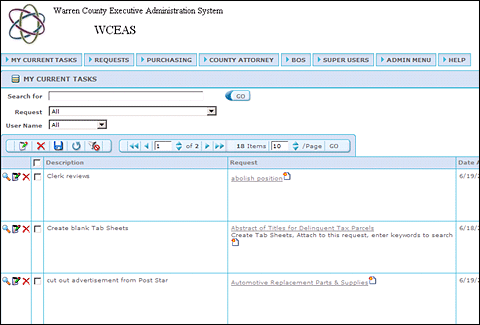
The main screen showing the workflow component of the application. Currently set
to show all users, non-power users would be locked in to only see their tasks. From
there, they can perform necessary actions and click "Step Complete" or "Roll Back".
This passes the task onto the next or prior user as defined in the workflow template.
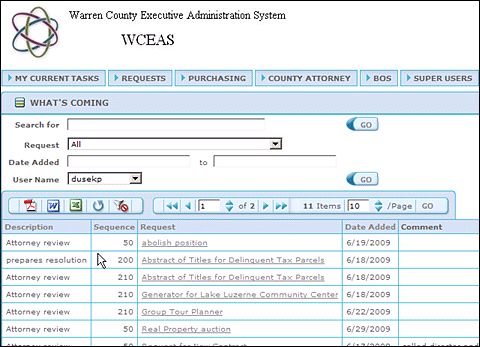
This screen shows all tasks assigned to a user
rather than the current task waiting to be performed.
These departments were functioning independently from one anther, communicating
via a costly and slow paper trail. The goal of the WCEAS application is to ease
communication across departments by eliminating the paper trail and moving to an
all-electronic form of communication.
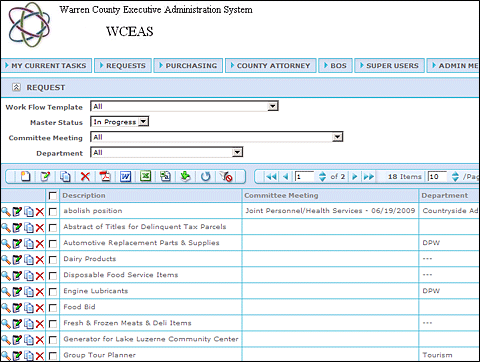
A request is the term we use to encompass all three modules and the workflow component.
When a request comes in, it is entered into the system, assigned one of the
available workflows, and the steps to complete that request are then entered into the
system and assigned to the user who is to complete that task. A request holds the
necessary resolution(s), contract(s), bid(s), document(s), and tasks(s) all under one container,
so all the departments can see the necessary documentation from the other departments.
Extensive role-based security is in place so that each department can only change its own items.
However, they can view the items they need the other departments to complete.
WCEAS action begins when a department submits a Resolution Request to be entered into
the system by a Legislative Office Specialist. The Specialist chooses a workflow
assigning the appropriate tasks to the people involved in the process across the three
departments. At each step of the workflow, a value in the form of data is added
to the database or documents attached for the next department to review. Hundreds
of requests can occur simultaneously. Users can track the progress of each request
as well as the database records from all the departments. Records may include scanned
or attached copies of actual supporting documents that lead to the final resolution,
contract or awarded bid.
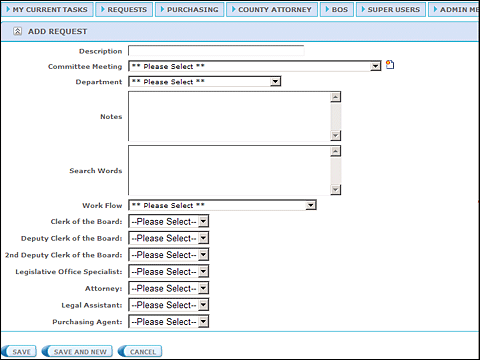
The Add Request Screen showing the Workflow Selection and the Assignment of the People
to Substitute for each Role in the steps.
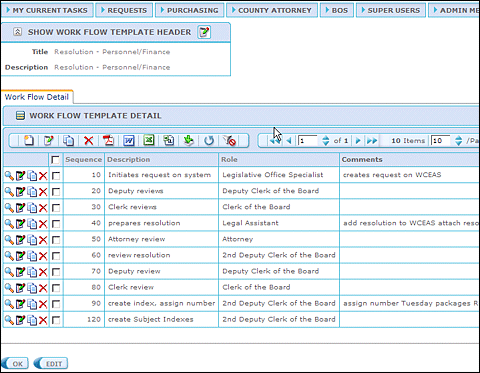
Tasks or steps are added under a workflow to show the steps needed to complete that task.
Each step is assigned to a Role. When the request is created, the members of that role are
presented in a dropdown menu and the person to complete that step will be substituted and that
step will show in their "My Tasks" when it becomes the active step of that task.
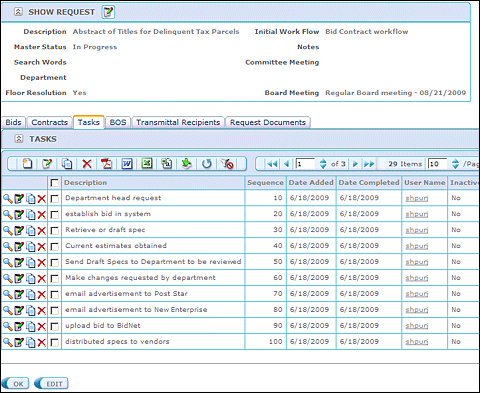
The Show Request Screen with the Tasks Tab selected shows that the workflow defined in
the Workflow Header was imported into these steps when the request was added and the
appropriate workflow was selected. From there the user can see the date completed and
completed by notifications as well as comments for each step in the request tasks.
|
Application size and scope |
The WCEAS application accesses one SQL Server 2005 database with 47 database tables
and 22 views. The largest table is the Resolution Table that spans more than 20
years of resolutions and contains more than 14,000 records. The Contract Table
contains more than 6,000 contracts. Eventually, the Tasks Table will grow with a
history of all the interactions of a particular request and will exceed 200,000 records.
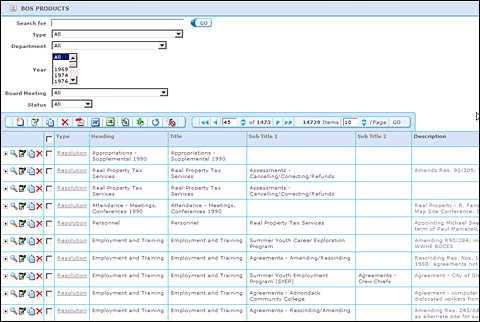
The Show BOS Products Table Page with no filter shows a history of 14,729 records that
have been imported into the system from a legacy system. It contains a complete history
of that Department's doings for the past 20 years.
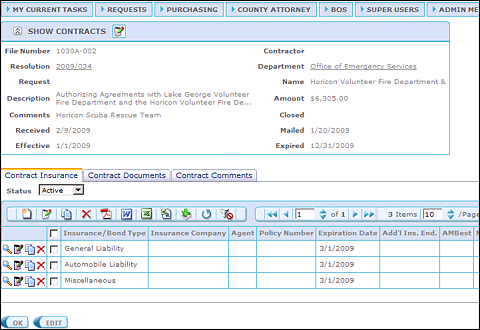
The Show Page for a particular Contract with child tables for Insurances and Expiration
Dates, Documents, and a Comment Table to record a history of all dealings with this contract.
There are 241 ASPX Web pages in the WCEAS application. We expect 25 to 30 daily users during
the first phase of development. In Phase Two, we will allow all 800+ county employees to
search.
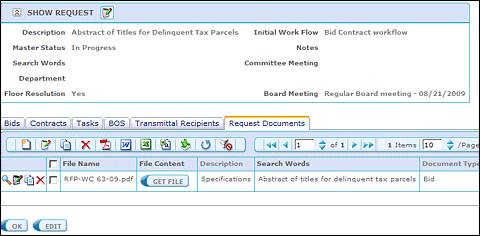
Any user can access the Documents tab and see everything associated with that request.
|
The project |
The project took one developer and one analyst three months to implement. The Iron
Speed Designer portion of the project took two weeks to complete. We needed to
write a few code customizations to assist in large-file uploading. Each customization is
short and contains fewer than 30 lines of code each. The code customizations took
one day to write.
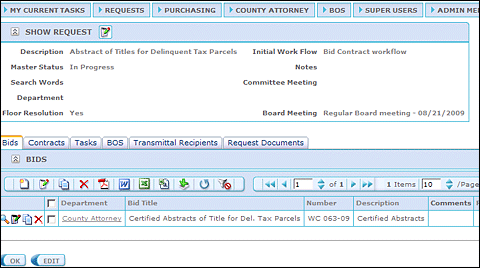
The Show Request Screen has the Request Information, as well as child tabs where
the request is linked to a Bid, Contract, BOS-Resolution, the Task Tab, the Recipients'
Tab to show who received notification of the request, and any uploaded documents.
|
Code extensions and customizations |
We spent one day adding 30 lines of custom code to accommodate users uploading large
files. The required changes to allow documents in excess of 2 MB to be uploaded was
found on the Forums and after implementing those changes we now upload 100 MB audio
files that contain the recorded conversations from every Board and Committee Meeting.
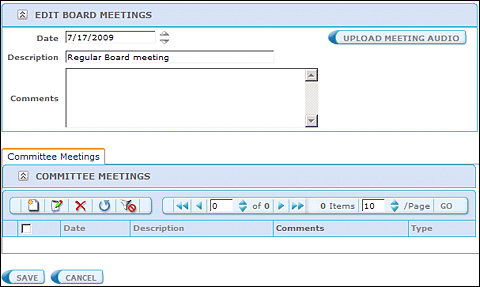
The Edit Board Meetings Screen with a button to upload the Audio File. This is
handled differently from the documents due to the large size of the audio files.
We used the Telerik RadUpload control which displays a nice progress bar during large
file uploads.
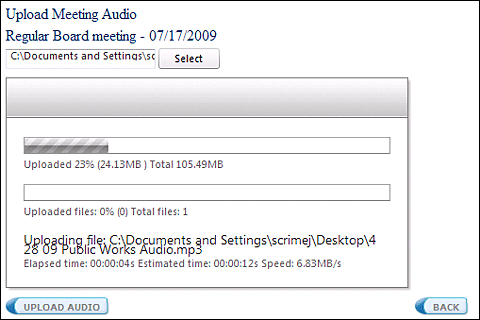
A screen shot of the Telerik RadUpload Control while uploading a 105.49 MB file.
|
Page layout customizations |
In our application, most of the pages are created with the new application wizard and
left as is with minor changes. Some application pages required minor modifications.
We did not create an application-specific theme. We used the standard White page style
in Iron Speed Designer.
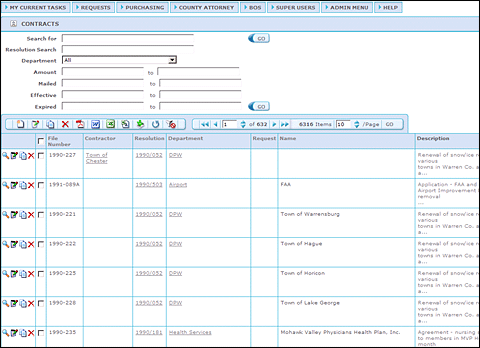
The Contract Module Show Table page with many filters.
|
Iron Speed Designer impact |
This application would not have been possible by hand with one developer and the two weeks
allotted. We estimate that by using Iron Speed Designer, we saved one year of a developer's
salary, which could range from $50,000 minimum to a maximum of $200,000.
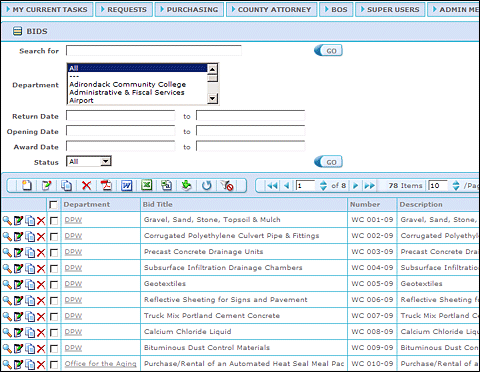
The Bid/Purchasing Module with filters for Department, Status, and various dates associated
with the bid.
The project could have been done without using Iron Speed Designer. However, it would have
been a multi-developer project with each developer taking on one of the four modules of Board
of Supervisors, County Attorney, Purchasing, and the Workflow Module. That process would
probably have taken three developers six months to more than a year to implement.
This means that, given Warren County's budget and personnel level, the project would not have
been feasible. We only have two developers on staff and needed to be able to roll out many
applications to the large number of users we support.
|
Next steps |
A big initiative in our county was to cut costs, and this application is going to help by:
| 1) |
Eliminating 90% of the printing and copying, paper, and toner by implementing an electronic system
|
| 2) |
Eliminating the time required by Administrative users to call other departments to check status
or to get copies of documents, or items from the archives
|
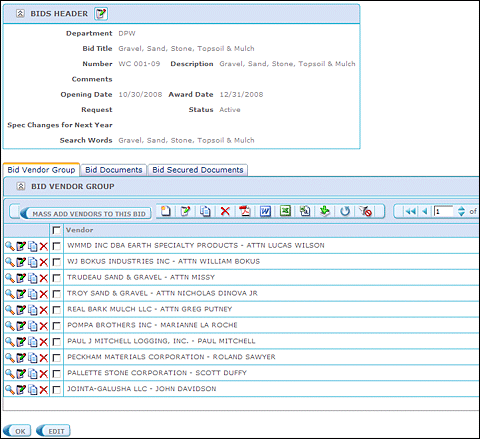
A Show Page for a particular bid with the child tables showing the vendors that were allowed to
submit bids, any documents submitted and/or the official bid that was awarded, as well as a section
for secured documents that only members of the Purchasing Role can see as it pertains to just their
department. The Bid Documents are uploaded to the database and are accessible by any other user of
the system with Read Privileges. This eliminates a call to the Purchasing Department to find the
information and/or documents on a bid and print/copy/fax them over.
|
About the developer |
Jeremy Scrime holds a Bachelor of Arts Degree from Siena College in Loudonville, New York.
Jeremy has been programming for more than 10 years. He has experience in Iron Speed Designer,
ASP.Net Development, Delphi, Visual RPG, FoxPro, Microsoft SQL Server, and Microsoft ASP.NET,
as well as Telerik ASP.Net Rad Controls. He is willing to work as a consultant and also offers
training services.
Jeremy Scrime is currently a Senior Programmer/Analyst at Warren County in Lake George, New York.
He has been using Iron Speed Designer as his sole means of application development for the past
two years.
|
|
|
|
|
|
|